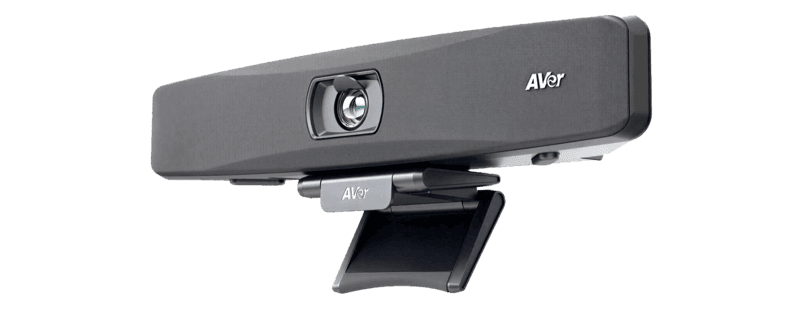
VB150
- 4K Ultra HD resolution with 120° wide field of view
- 5-element beamforming mic array with 5m pickup
- Onboard AI Smart Composition & Voice Tracking
- Integrated physical privacy shutter & eco-friendly build
Specifications
FAQs
What room sizes and environments is the compact AVer VB150 engineered for?
The AVer VB150 is specifically engineered for huddle spaces, phone booths, focus rooms, and small meeting spaces seating 2 to 6 people. Its ultra-wide 120° diagonal field of view ensures everyone seated near the screen or along shallow walls remains fully visible in 4K resolution without optical edge distortion.
How does Smart Composition technology work on the AVer VB150?
Smart Composition is an onboard AI video framing feature designed for equitable hybrid meetings. Rather than displaying a single wide room shot, Smart Composition captures individual close-up shots of active participants and places them side-by-side in a split tile view. This gives remote attendees a clear view of facial expressions and body language, matching the experience of a dedicated multi-camera meeting system.
Does the AVer VB150 include a physical privacy shutter?
Yes, the AVer VB150 includes a built-in physical privacy shutter. The shutter automatically opens when a video call starts and closes tightly when the call ends or when the unit is in standby mode, giving room users absolute peace of mind regarding privacy and security in sensitive meeting environments.
How is the AVer VB150 connected and installed in BYOD rooms?
The AVer VB150 features a simple plug-and-play USB architecture. Users connect a single USB Type-B to Type-A/C cable to their laptop or in-room compute unit to pass high-definition 4K video and bi-directional audio. The VB150 comes with a versatile wall-mount bracket and can also be mounted directly to displays using optional TV VESA mount hardware.
Which video conferencing software apps are supported by the AVer VB150?
The AVer VB150 is plug-and-play compliant with all major unified communications tools, including Zoom, Microsoft Teams, Google Meet, Skype for Business, RingCentral, Cisco Webex, Intel Unite, and GoToMeeting. Enterprise administrators can manage, update, and configure the camera remotely using AVer’s WebUI, EZManager, and PTZApp 2 software.