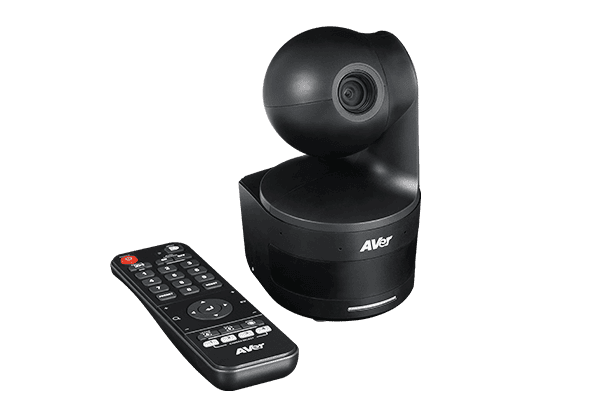
DL10
- 1080p/60 AI Auto Tracking & Gesture Control
- 3X Optical Zoom (6X Total Zoom)
- Dual Omnidirectional Noise-Canceling Microphones
- USB 3.1 & IP Streaming Outputs
Specifications
FAQs
What sets the AVer DL10 apart for remote and hybrid classroom teaching?
The AVer DL10 is engineered specifically for educators who need a portable, plug-and-play auto-tracking camera without complex setup. Weighing only 745 grams, teachers can easily move it between classrooms or use it at home. It features onboard AI auto-tracking that follows the instructor seamlessly without requiring lanyards, beacons, or external sensors. Combined with built-in noise-canceling microphones and 3X optical zoom, it delivers crystal-clear 1080p video and audio over a single USB connection directly into remote learning sessions.
How does AI gesture control work on the AVer DL10?
The DL10 incorporates intuitive AI gesture control that lets teachers operate tracking functions without touching a mouse, remote, or keyboard. By holding up simple hand gestures in front of the lens, instructors can easily toggle tracking on or off, switch between full-body and upper-body framing, or lock focus onto specific teaching areas. This allows educators to maintain natural teaching rhythm and keep their focus entirely on the students.
Does the DL10 need external microphones or audio hardware for virtual lectures?
For standard classrooms and home offices, external microphones are unnecessary. The DL10 features two built-in omnidirectional microphones with advanced noise suppression algorithms that capture speech clearly up to 5 meters (16 feet) away. The system actively suppresses ambient background noise, such as HVAC fans or classroom rustling, ensuring distant students hear every instruction clearly over USB or IP streams.
How does the DL10 ensure privacy and security when not in use?
The DL10 features dedicated hardware privacy mechanisms. When a lesson ends or the connected computer enters sleep mode, the camera automatically enters Sleep Mode within 10 seconds and tilts its lens downwards to 90 degrees. This physical lens stowage ensures complete visual privacy between classes without requiring manual covers or unplugging the power cord.
How does the DL10 connect to conferencing platforms like Zoom and Microsoft Teams?
The DL10 connects via USB 3.1 as a standard UVC (USB Video Class) and UAC (USB Audio Class) device, providing full driverless plug-and-play integration with Microsoft Teams, Zoom, Google Meet, OBS Studio, and Webex. Additionally, it supports simultaneous IP streaming via RTSP and RTMP for direct broadcasting to school LMS platforms or YouTube Live.