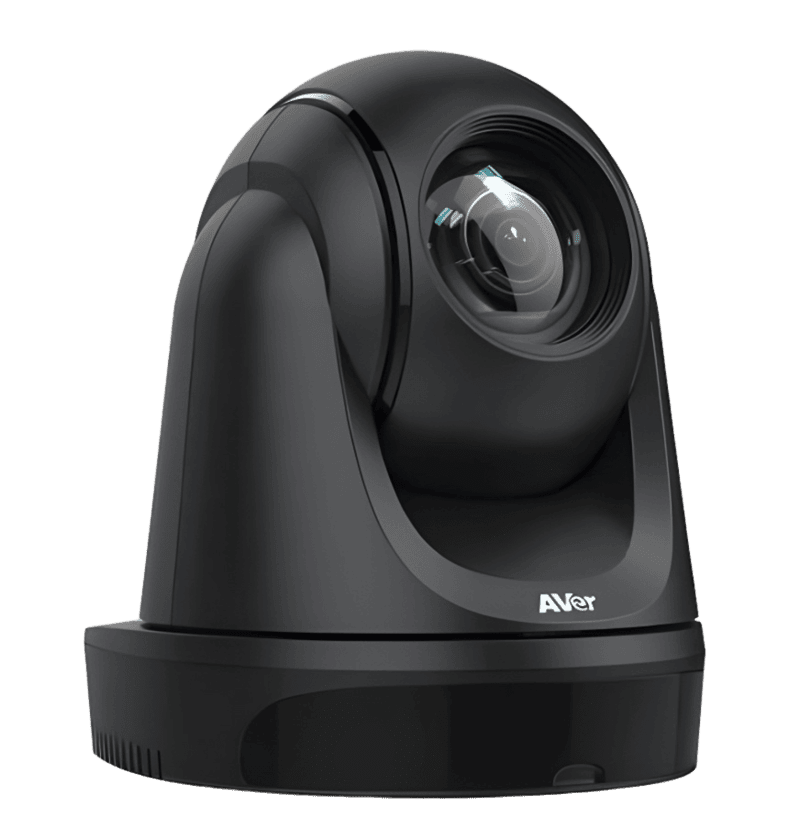
DL30
- 1080p/60 AI Auto Tracking
- 12X Optical + 2X Digital Zoom
- USB 3.1 & IP Outputs
- PoE+ Single-Cable Power
Specifications
FAQs
What makes the AVer DL30 ideal for hybrid and distance learning classrooms?
The AVer DL30 is purpose-built for education environments where teachers move freely between whiteboards, demonstration areas, and student desks. Its AI auto-tracking engine detects human forms and smoothly follows the presenter without requiring wearables, lanyards, or manual camera operators. With 12X optical zoom, the DL30 captures close-ups of blackboard writing from the back of large classrooms while maintaining full 1080p60 clarity. The camera supports two simultaneous outputs, USB to a classroom PC and IP streaming to remote students, making it a single-device solution for hybrid teaching workflows. Teachers simply walk in and teach; the camera handles framing automatically.
Does the DL30 require any special software or wearable devices for tracking to work?
No. The DL30 uses onboard AI human detection algorithms that recognize body shapes and movement patterns directly in the camera hardware. There are no separate tracking beacons, Bluetooth tags, or software licenses required. The camera ships with tracking modes that can be selected through the free AVer PTZ Link app or a simple web interface, including Zone Tracking for whiteboard areas and Presenter Tracking for individual speakers. This zero-wearable approach saves schools from ongoing replacement costs for lost or damaged tags and works equally well for guest lecturers who do not have school-issued devices.
Can the DL30 power and connect over a single Ethernet cable?
Yes. The DL30 fully supports PoE+ (IEEE 802.3at), which delivers both power and network connectivity over one CAT6 cable. This dramatically simplifies installation in existing classrooms where power outlets near the display or ceiling mount are limited or unavailable. With PoE+, integrators can run a single cable from a network switch to the camera location and handle video streaming, camera control, and power simultaneously. The camera draws approximately 12 watts under normal operation, well within the 25.5W budget of standard PoE+ switches from Cisco, Aruba, and Netgear.
How does the DL30 integrate with popular video conferencing platforms and LMS systems?
The DL30 presents itself as a standard UVC (USB Video Class) 1.1 device when connected via USB, meaning it works plug-and-play with Zoom, Microsoft Teams, Google Meet, and Cisco Webex without additional drivers. For IP streaming, it outputs H.264/MJPEG over RTSP and RTMP, compatible with OBS Studio, Wowza, and YouTube Live for lecture capture. For learning management systems, schools can pair the DL30 with AVer PTZ Link to automatically trigger camera presets when teachers start screen sharing or open specific applications.
What is the difference between the DL30 and a standard PTZ camera without tracking?
A standard PTZ camera requires either a dedicated operator with a joystick or pre-programmed presets that must be manually recalled during a lesson. If a teacher moves unexpectedly, the camera stays pointed at an empty chair until someone intervenes. The DL30 eliminates this dependency through real-time AI analysis of the video feed. It detects when a presenter walks, turns, or writes on a side whiteboard, and automatically pans, tilts, and zooms to maintain proper framing. For schools without AV staff, this means every recorded lecture stays professionally framed. For integrators, it means fewer support calls about empty-room recordings and higher customer satisfaction on education projects.